If you’re looking for real strategies for EAs when the schedule feels unmanageable, you’re in the right place. If your Executive’s calendar feels like it’s running the show, you’re not alone.
We’ve all had those weeks where your Executive walks into a meeting without knowing why they’re there, people don’t turn up, there’s no agenda, the wrong prep materials are shared, and everything runs behind. Then, outside of the meetings, they’re working into the evening, trying to catch up, and you can see they’re stretched thin.
You know what a good schedule should look like – space to think, time to get work done, and meaningful priorities – but every time you try to help, the changes get swept aside. You add buffer time, and it gets filled. You ask for agendas, and people ignore the request. Your Executive keeps an open door and says yes to everything because they don’t feel they can say no.
It’s frustrating. Especially when you’re doing your best to support them and you don’t feel like you have the authority to take control.
In this article, we’re going to look at the real-world, practical things you can do. Real strategies for EAs when the schedule feels unmanageable, even when the organization is hectic and your Executive isn’t the final decision-maker.
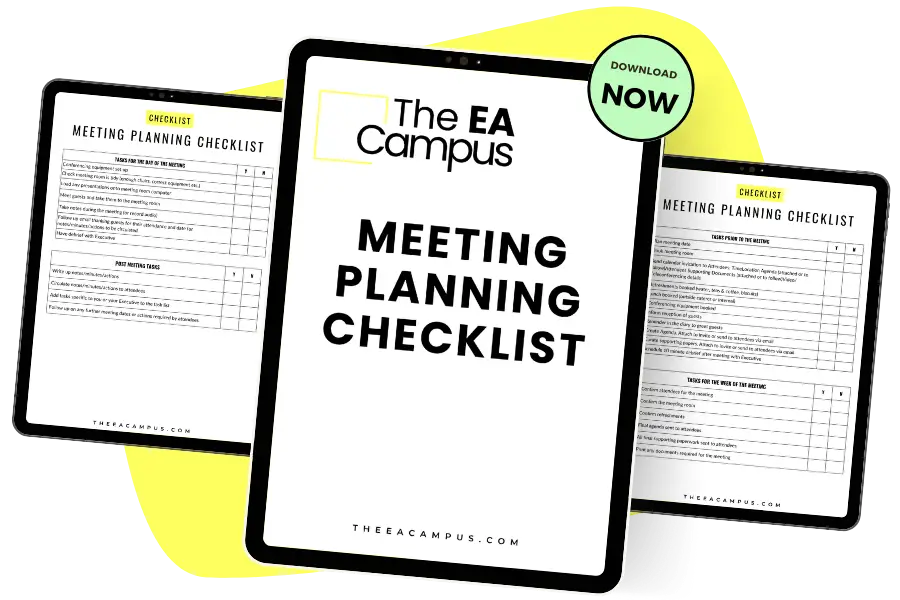
Ensure that every meeting is planned meticulously and that your Executive is prepared for every meeting they attend with our free Meeting Planning Template for Executive Assistants.
Without making a big deal out of it!
We talk a lot on The EA Campus about time audits, and we’ve got plenty of templates and resources to help. But if you’ve ever looked at one and thought, “What’s the point? My Executive probably won’t follow through,” we get it.
This step isn’t for your Executive. It’s for you.
When the calendar feels completely unmanageable, sometimes the best place to start is with a bit of clarity. You’re not doing this to present back to your Executive or overhaul their schedule in one go. You’re doing it to understand what’s really happening week to week, because without that, it’s almost impossible to make meaningful changes.
Start with a simple week-by-week spreadsheet. Categorize the meetings:
Then do a quick time analysis:
We’re not aiming for perfection here; not every meeting will be easy to categorise, and not all of your time should be spent on this activity. We’re looking for real strategies for EAs when the schedule feels unmanageable. Patterns will start to show up. Maybe meetings constantly clash or run over. Maybe you spot a weekly slot that could work as a no-meeting zone. You’re giving yourself something solid to work with – and that makes a real difference.
And if you’re thinking, “When am I meant to have time to do all this?” – we get that too. When the schedule is this unmanageable, chances are your own day is just as reactive, and you’re busy putting out fires. This doesn’t need to be a big time investment. A quick review at the end of the week or 15 minutes first thing Monday morning is enough. All we’re aiming for here is a general sense of what’s going on with your Executive’s calendar, so you can start to take small, helpful steps forward.

Once you’ve done a basic time audit and have a clearer view of what’s really going on in your Executive’s calendar, the next step is starting a conversation. Not a confrontation. Not a presentation. Just a thoughtful, supportive check-in that surfaces some of what you’ve seen.
When the schedule feels completely unmanageable, your Executive might not even realize how reactive things have become. That’s where we come in. As Assistants, we’re in a unique position to spot patterns and gently raise them in ways that are helpful, not critical. The audit will certainly help with this.
Before you bring any of this up, though, it’s important to think about the environment you work in.
If you’re in a fast-paced culture where priorities shift constantly and it’s normal to scrap an entire week of meetings because the topic’s no longer relevant, then this type of conversation might need a different tone. If your Executive thrives on back-to-back meetings and loves the feeling of being in demand, you’ll need to tailor how you share the information.
Understanding the context you’re working in, and your Executive’s personality and style, will help you choose the right way to present what you’ve seen. The same calendar audit can lead to very different conversations depending on those factors.
This isn’t about calling anything out. It’s about offering support:
These quick observations help build trust. You’re showing that you’re paying attention, that you care about how your Executive is working, and that you’re there to support them.
You don’t need to bring every issue up at once. Pick one or two things that stand out and raise them in your regular check-in or when there’s a natural opportunity. Keep it casual and collaborative. Our go-to resource on managing an Executive calendar is this article from the Harvard Business Review, it has real strategies for EAs when the schedule feels unmanageable.
This is one of the most important real strategies for EAs when the schedule feels unmanageable: using what you see in the calendar to open the door to small, meaningful improvements.
When we start naming the patterns, we give our Executives the chance to recognize what’s not working, and some thoughtful space to do something about it.
Now that you’ve started to spot patterns and opened up a conversation with your Executive, let’s move on to some real, tangible strategies you can put in place to help when the schedule feels completely unmanageable.
We’re not aiming for the perfect week here. If the “ideal week” feels completely out of reach, don’t worry. That’s normal in a fast-paced environment. Instead of trying to fix everything at once, focus on small, low-risk changes that support your Executive and build momentum. And just to be clear—we’re not doing anything behind our Executive’s back. This is part of your role. You don’t need permission to suggest better ways of working or to try small improvements that support time management. Sometimes, proceeding until apprehended is what works best in this role.
Here are a few micro-wins you can start with:
Add 5–10 minute buffers between one or two key meetings. These short gaps give your Executive a chance to breathe, reset, or shift gears, especially if meetings are running back-to-back. Be mindful of how you label them—calling it “thinking time” can sometimes invite it to be overridden. Try options like “travel buffer,” “connection time,” “follow-up slot,” or “handover window.” You could also align it with something practical, like “meeting wrap-up” or “admin pause.” The goal is to create protected moments that feel purposeful, not expendable. And if it does get filled? That’s okay. Keep reintroducing it. You’re planting the idea that not every moment needs to be booked solid.
Push back on new meeting requests that don’t have a clear purpose. You could decide to make it a policy that meetings aren’t accepted without an agenda—but that might feel like too much too soon, depending on your environment. Instead, start by asking, “What would make this meeting successful for you?” or “What do you need from me to support this meeting?” It opens up a conversation and gives you the chance to help shape the meeting’s purpose. Sometimes, it might be you who ends up putting together a quick agenda, or suggesting another way to achieve the same outcome without a full meeting.
Create a daily anchor. This could be a 15-minute morning check-in or a short slot each afternoon to regroup. It doesn’t need to be formal. What matters is that it becomes a consistent, protected moment in the day. One thing to make clear to your Executive is that for you to do your job successfully, you need that time with them. Keep asking for it. Keep putting it in the diary. Even if it moves around or gets bumped now and then, having a regular point of contact helps you stay aligned and gives you space to raise small issues before they become bigger ones.
These small changes aren’t going to transform everything overnight. But they’re real strategies for EAs when the schedule feels unmanageable. They give you a starting point. And when you show your Executive that you’re not trying to take control, just making things smoother, they’re more likely to let you build on that progress.

Pick one time slot each week and block out 60–90 minutes as protected time. Don’t oversell it. Just label it as something your Executive won’t immediately question – “Board Prep,” “Admin Review,” “Drafting,” or even something more vague like “Project Work.”
You don’t need to advertise that it’s protected. You’re simply creating a small breathing space in their week that isn’t externally dictated. Where you can, don’t accept meetings that fall into this time. If someone outside your Executive questions it or needs the slot, and it’s absolutely necessary, you can move the block, shorten it for that week, or offer an alternative time, especially if you have the authority to do so. The idea is to protect the time without making it untouchable. Be flexible, but intentional.
If your Executive adds a meeting into this time, that’s okay. Expect it. But make a note of how often that happens, and each week, put the block back in. You are consistently creating opportunities for them to catch their breath. If you feel comfortable, you can say, “I’ve been holding this time each week for deep work or thinking time, do you want me to find another space for this new meeting instead?”
In some cases, you can even hold the space under the impression that a meeting might be going there. That way, your Executive doesn’t feel like the time is being protected from them, but you’re quietly giving them margin to work with. The point is, you’re setting the tone that not every slot needs to be filled.
And if you’re looking for even more control over what gets booked, there are a few quiet tricks you can try – like setting up an inbox rule so that new meeting invites skip your Executive’s inbox and land with you instead. If you have access to their email, this can help you triage meeting requests before your Executive even sees them. Again, you’re not hiding anything here; you’re supporting their time management by filtering what truly needs their time and attention. That extra layer of screening gives you a better chance of protecting their schedule without constant firefighting.
If meetings are the main pain point in your Executive’s schedule, one of the easiest and most impactful changes you can make is insisting that every meeting has an agenda. It sounds simple, but it changes everything. When someone has to take the time to think about what the meeting is actually for, it often gets canceled or replaced with a quick email or phone call. And that’s a win.
If you have your Executive’s go-ahead to put this in place, you’ll notice the difference right away. But even if you don’t, you can start taking control in small ways. If you’re managing the calendar, you can be the one to draft the agenda or ask for it upfront.
You might not want to go full “no agenda, no meeting” just yet, but you can still raise the bar:
Here is the conversation starter to put this rule into place:
“Hi all – Just a reminder that [Executive] is attending [Meeting] on Thursday at 11am. Please confirm:
Don’t ask if they want this. Just do it. People will start to expect it, and in many cases, rely on it. You’re helping make meetings more useful, which is better for everyone involved.
If it makes sense, you can also quietly decline meetings without agendas or push back gently by offering a different format. The point is, you’re putting structure around time that’s often unstructured, and that’s one of the most effective real strategies for EAs when the schedule feels unmanageable.
This one matters. Because when your Executive’s schedule feels completely unmanageable, it’s easy to feel like you should be doing more. Like it’s your job to fix it. But there is only so much you can do. If you’ve had an open and honest conversation, if you’ve explained how you can help, if you have asked for more authority to make decisions around the schedule, and you have tried to implement new ways of working, you have done everything you can to improve the situation.
You don’t have full control. You’re not the CEO. You’re working in a fast-paced, reactive environment with competing priorities, and it is not your responsibility to carry the emotional weight of that system.
So take a breath. You’re doing your job.
What you can do is start small. Build new habits. Spot the patterns. Back up your instinct with just enough data to make your case. And then try again next week.
Even a few small changes can make a huge difference. Helping your Executive reclaim just a couple of hours a week might be what stops them from burning out. Or what helps them show up better in the meetings that matter. Or what gives you a little breathing room to be proactive instead of always reactive.
These are real strategies for EAs when the schedule feels unmanageable – but they won’t all work at once. And that’s okay. You’re doing enough. Keep showing up. Keep nudging things forward.
If you want to build on these strategies and learn how to implement them in your role, check out our Effective Assistant Bundle course. It covers everything from time management to calendar control, with practical tools you can start using right away: Effective Assistant Bundle.
Share this article:
Join 30,000+ Assistants receiving our carefully crafted weekly newsletter packed with valuable tips, tricks, and insights tailored specifically for Assistants like you.